To Update Or Not To Update

The typical recommendation in the world of software has been to update to the latest version as soon as possible. New versions often have security fixes and resolved vulnerabilities. Of course, updating right away didn’t always work out well. Sometimes a new release introduced more issues than it resolved, or there were major changes that ruined the user experience. But for the most part it was still the best approach from a security perspective.

In the WordPress ecosystem, you can have plugins auto-update and I’ve had that enabled for all plugins in the WordPress installations I manage. I’m reconsidering that decision based on a few recent events.

Attackers have bought popular WordPress plugins, giving them access to potentially hundreds of thousands of installations, then released malicious updates.

The issue isn’t isolated to WordPress. The same thing has happened numerous times to web browser extensions, which auto-update whether you like it or not. Attackers have bought the extension from the original owner, or paid existing maintainers to introduce malware. It’s hard to blame the maintainers when they’re devoting their time for free and often deal with complaints from entitled users.

Regardless of the reasons behind the attacks, you’re left with a conundrum: Do you update to the latest version and risk supply chain attacks or do you hold off and hope you’re not exploited by a known vulnerability?

An approach used by package managers such as Bun and pnpm for Javascript’s NPM packages is a cooldown or delay. This provides time for third party malware scanners to discover issues before you install the update. Attackers have thwarted these somewhat by releasing delayed attacks, where the initial release shows no signs of trouble, then a backdoor is triggered several months later.

Although it’s not available for WordPress plugins, you could simulate the same behavior by keeping track of each plugin release and manually updating a week or so after. It’s clearly not ideal.

We rely on so many dependencies maintained by a large number of developers, but what’s a better alternative? It’s our reality and we’ve known about it for years.
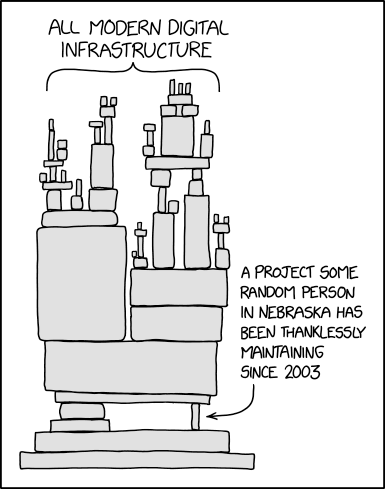
The dangers of modern dependencies

I wish I had a better solution, but I’m not aware of a good, clean fix. I’ve reduced the number of WordPress plugins and browser extensions I use to reduce the attack surface. And of those I still use, I selected ones with tens of thousands of installs in the hopes that someone will detect an issue and warn the rest of us before too much damage is done.
Backups Make Everything Better

I have been seeing posts more and more frequently from frustrated users blaming a provider for losing their data. There are numerous scenarios. Sometimes an account is disabled due to being hacked and sending out spam. Other times the user was actively misusing the service. Sometimes the service provider was breached and all of the servers were encrypted with ransomware. Power outages, government seizures and in rare cases, datacenters going up in smoke, can all lead to data loss. But only naive fools believe a service provider will avoid all possible catastrophes.

Whatever the cause, the end result is the same – your data is no longer accessible. It’s easy (and lazy) to blame someone else. Why didn’t they have redundant power? Why didn’t they have better security? Why didn’t they allow temporary access to the data after my server was spamming? Why didn’t they spend thousands of dollars to fight the government subpoena to protect my $7/year service?

You are responsible for your data.

It’s usually in the terms of service, but even if it’s not, that’s the reality. No one cares about your data except you. If it’s important, back it up.

The beautiful thing is when you have automated, periodic backups, would-be disasters become mild annoyances. If your server data is no longer available, you can set up a new server, restore from backups and you’re on your way again with no data loss.

If you don’t back up your data, then you are behaving as if it’s not worth preserving. So please stop whining when it’s gone.

Local Docker Port Exposed

If you’re using docker with ufw (Ubuntu Firewall), your local ports may be exposed to the outside world. I recently read about this issue and when I checked, sure enough, the local ports of all of my docker containers were readily accessible.

It felt like being caught with my fly down. Why in the world docker does this by default is beyond me. And it’s not as if they’re not aware of it. This GitHub issue clearly lays out the problem. It’s disappointing the issue has existed for so long and the Docker team isn’t willing to fix it. It’s a major violation of the secure by default principle.

If you too are learning about this, here’s the fix.

1. Create /etc/docker/daemon.json if it doesn’t already exist
2. Add the following content to the file

{
  "iptables": false
}

3. Restart docker sudo service docker restart

Who knows if there are other docker vulnerabilities I’m not aware of, but at least in this case, my servers have zipped up.

Update: I discovered that disabling iptables has the side effect of blocking outgoing network requests from your containers due to ufw’s default behavior. If this creates a problem, you can leave iptables enabled, but bind your ports to localhost. For example, instead of using 3001:3001 for your ports, use localhost:3001:3001. Alternatively, you can make ufw allow outbound requests.

How to Speed Up Ansible Playbooks

If you’re using Ansible to maintain server configurations, you’re probably quite aware that speed is not something often used to describe Ansible. But I recently came across a plugin that had an amazing 82% performance improvement. And it took a single command and two lines in the ansible.cfg.

The plugin is Mitogen, more specifically Mitogen for Ansible.

On my Ubuntu Ansible controller server I installed it with pip3 install mitogen, then added these two lines to ansible.cfg:

strategy_plugins = /usr/local/lib/python3.8/dist-packages/ansible_mitogen/plugins/strategy
strategy = mitogen_linear

Now a simple playbook that used to take 45 seconds takes 7 seconds. And a larger playbook that used to take ~3 1/2 minutes finished in just over 32 seconds. It’s rare to get such a massive performance improvement without any downsides (at least none I’m aware of).

So if you’re a fellow Ansible user, I highly recommend adding Mitogen.

Chrome 85 Causing Login Failures

Google Chrome recently updated to Version 85.0.4183.83 on my machines, but unlike most updates, there was a rather unfortunate downside to the update. I was no longer able to log in to certain web sites. The problem manifested in two ways that I saw. One, an infinite redirect loop and two, a failed login even though I’d entered valid credentials.

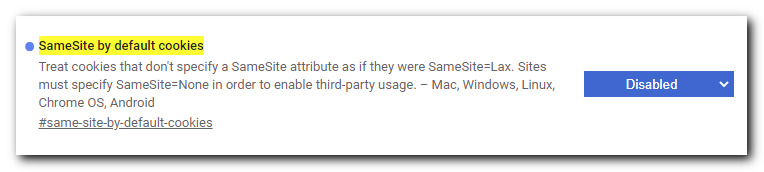
The fix was not at all obvious, hence this blog post. I had to disable the “SameSite by default cookies” flag.

Chrome flag SameSite by default cookies disabled

1) Open this URL in Chrome: chrome://flags/#same-site-by-default-cookies

2) Select “Disabled” in the dropdown.

3) Restart Chrome (the entire browser, not just the tab or window)

I was able to log in to the aforementioned sites in Firefox, so my guess is the Chrome team is using their monopoly to push a more restrictive security feature that ends up breaking sites that haven’t gotten the memo. Hopefully this is a temporary fix and the flag can be enabled again once sites realize their users can’t log in with Chrome.