Free Windows Countdown Timer
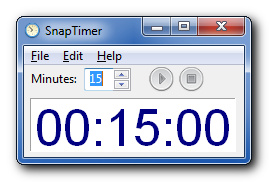
I’ve been searching for a Windows countdown timer that satisfied all my requirements for a long time. If you recall, I searched back in 2008 and posted my findings here. I’ve continued to search without success, so I decided to write my own. It’s called SnapTimer.
While writing it I reviewed all the Lifehacker timer posts and implemented any reasonable feature I could find. It’s flexible enough to be used with the 2-minute rule in GTD, the Pomodoro technique, the 30 minutes of uninterrupted work from the Now Habit, Steve Pavlina’s 15-minute method, Merlin Mann’s (10+2)*5 hack and any other productivity method requiring a timer.
I’ve been using it for the past few weeks and I’ve seen a significant increase in productivity. I hope you will too.
Hi, excelent program. One feature request: disable manual window resizing.
@yethwa Thanks. Do you mean to automatically resize the Window to when you change font sizes? If so, I’m planning to implement that in the next release.
I mean if I catch a corner of the window, I can change its size. I think that it is not needed, automatically resize of the Window when I change font sizes is good idea.
And one more thing why sometimes time flashes every second?
@yethwa Even when it auto-resizes, there’s no harm in being able to adjust the size. If you don’t want to resize the window, then don’t :)
I tried to stop the flashing for a while, without much luck. The form is double-buffered which is supposed to stop it, but it obviously hasn’t.
Hi Dan–
I love this app. Great work. Just curious: Is there a way to set a countdown to 30 seconds? I can only seem to set per minute countdowns.
Rob
Hey Rob, thanks for the comment. There’s an undocumented way to make it countdown in seconds (though the label will still say minutes). Open up SnapTimer.ini with a text editor like Notepad and add this line anywhere in the [Main] section: SecondsMode=1
With this set the value in the minutes field will be treated as seconds. You can turn it off by setting the value to 0.
Thanks, Dan. That’s definitely helpful. It would be great to see this functionality incorporated officially in a future release. Could you make it so that typing a period or colon and then numbers updated the seconds? Just an idea.
Rob
I’d thought about allowing decimals, but I hadn’t considered a colon. That’s a great idea! It’s been added to the todo list.
Thank you very much!!! the program really helpful.
thank you again…
@Sreng You’re welcome, thanks for the comment.
I reinstalled Snaptimer on a new windows 7 OS change. Was running XP and Snaptimer worked great. Now it flashed every second. Is there a fix?
thanks
That’s odd. I’m running Windows 7 and it works without flashing at all. I’m not sure what would be causing the flashing on your computer.