Local Docker Port Exposed
If you’re using docker with ufw (Ubuntu Firewall), your local ports may be exposed to the outside world. I recently read about this issue and when I checked, sure enough, the local ports of all of my docker containers were readily accessible.
It felt like being caught with my fly down. Why in the world docker does this by default is beyond me. And it’s not as if they’re not aware of it. This GitHub issue clearly lays out the problem. It’s disappointing the issue has existed for so long and the Docker team isn’t willing to fix it. It’s a major violation of the secure by default principle.
If you too are learning about this, here’s the fix.
1. Create /etc/docker/daemon.json if it doesn’t already exist
2. Add the following content to the file
{
  "iptables": false
}
3. Restart docker sudo service docker restart
Who knows if there are other docker vulnerabilities I’m not aware of, but at least in this case, my servers have zipped up.
Update: I discovered that disabling iptables has the side effect of blocking outgoing network requests from your containers due to ufw’s default behavior. If this creates a problem, you can leave iptables enabled, but bind your ports to localhost. For example, instead of using 3001:3001 for your ports, use localhost:3001:3001. Alternatively, you can make ufw allow outbound requests.
How to Speed Up Ansible Playbooks
If you’re using Ansible to maintain server configurations, you’re probably quite aware that speed is not something often used to describe Ansible. But I recently came across a plugin that had an amazing 82% performance improvement. And it took a single command and two lines in the ansible.cfg.
The plugin is Mitogen, more specifically Mitogen for Ansible.
On my Ubuntu Ansible controller server I installed it with pip3 install mitogen, then added these two lines to ansible.cfg:
strategy_plugins = /usr/local/lib/python3.8/dist-packages/ansible_mitogen/plugins/strategy
strategy = mitogen_linear
Now a simple playbook that used to take 45 seconds takes 7 seconds. And a larger playbook that used to take ~3 1/2 minutes finished in just over 32 seconds. It’s rare to get such a massive performance improvement without any downsides (at least none I’m aware of).
So if you’re a fellow Ansible user, I highly recommend adding Mitogen.
Chrome 85 Causing Login Failures
Google Chrome recently updated to Version 85.0.4183.83 on my machines, but unlike most updates, there was a rather unfortunate downside to the update. I was no longer able to log in to certain web sites. The problem manifested in two ways that I saw. One, an infinite redirect loop and two, a failed login even though I’d entered valid credentials.
The fix was not at all obvious, hence this blog post. I had to disable the “SameSite by default cookies” flag.
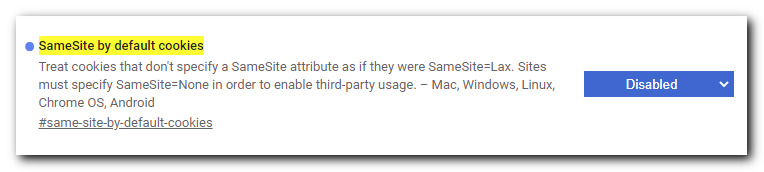
1) Open this URL in Chrome: chrome://flags/#same-site-by-default-cookies
2) Select “Disabled” in the dropdown.
3) Restart Chrome (the entire browser, not just the tab or window)
I was able to log in to the aforementioned sites in Firefox, so my guess is the Chrome team is using their monopoly to push a more restrictive security feature that ends up breaking sites that haven’t gotten the memo. Hopefully this is a temporary fix and the flag can be enabled again once sites realize their users can’t log in with Chrome.
Cleaning Up The Web
As web pages get more cluttered, even ad blockers don’t cut it. Medium.com pages are particularly hard to read with the huge notice they add on the bottom of the page, covering up the content and making it difficult to read.
My solution has continued to work surprisingly well for the past few years. It’s a bookmarklet that removes all sticky elements (ones that stay visible when you scroll).
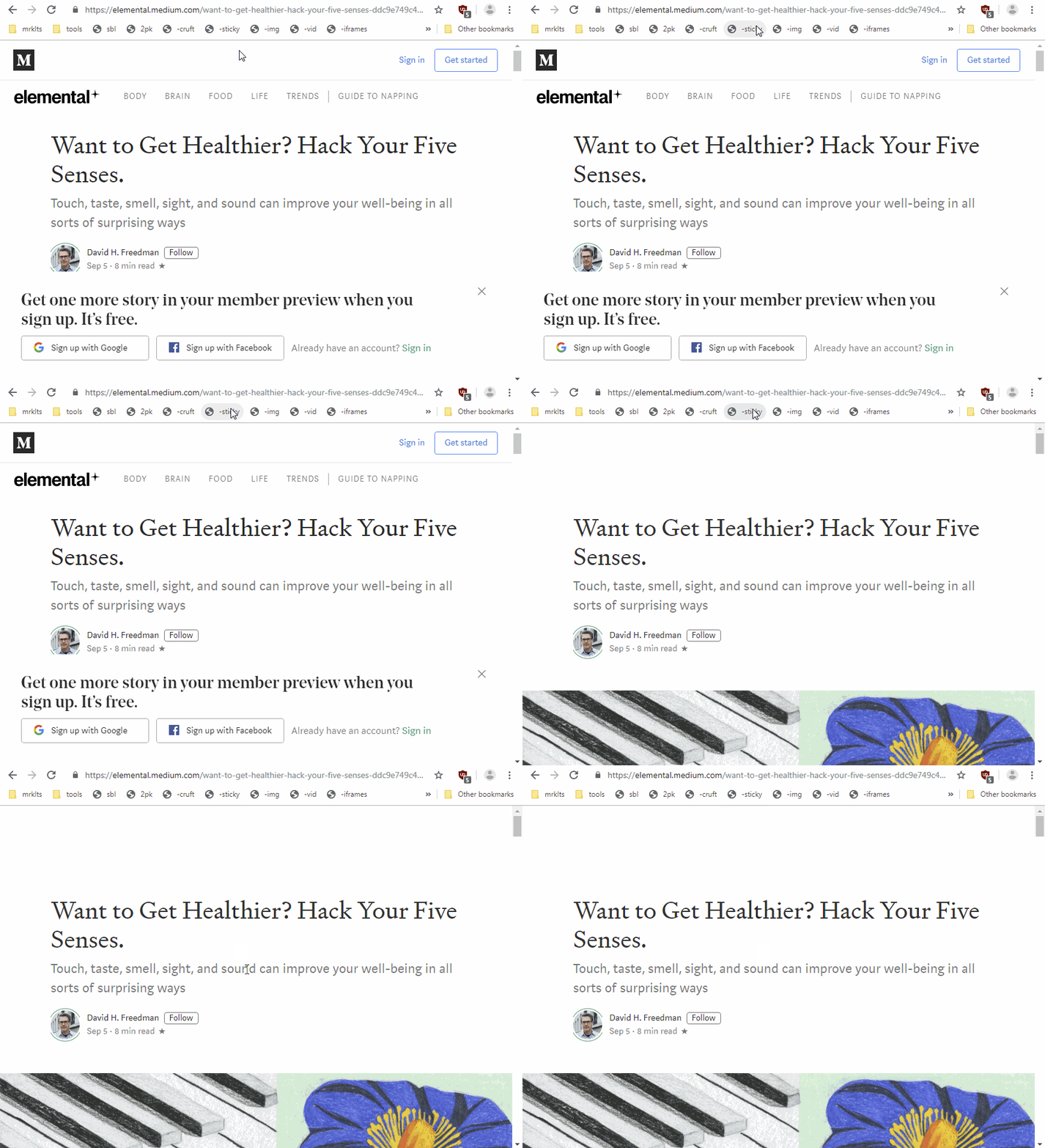
The bookmarklet in action on a random Medium.com page
To use it, drag the link below to your browser’s bookmarks bar then click on it whenever a web page looks a little cluttered.
Free Printable Weekly and Daily Planners
I searched high and low for free, printable PDF weekly and daily planners for my kids to be able to schedule their days and weeks. I expected to find dozens of options but was surprised to find very few. Of those few, some plastered their logos all over or declared the document could only be used by students of a particular university. Others wanted you to create an account or trade your email for the document. And others were close to what I wanted, but didn’t have 1/2 hour increments or some other small detail. It all seemed excessive for such a simple document. So I created two planners that can be freely downloaded and used for whatever purposes you can come up with.


Happy planning!