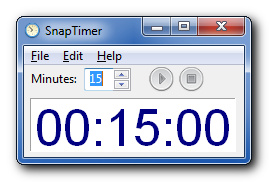
SnapTimer is a simple, free, portable countdown timer for Windows.
All the timers I tested were too complex for my taste. I decided to write one that was dead simple, so you could run it, type in a time and hit enter. The aim of SnapTimer is to get out of the way and help you be productive. It's fast, lightweight and simple to use, but powerful too.
A popular productivity strategy is to use a timer to do mini-sprints of work. Using SnapTimer I've increased my productivity and reduced procrastination. It's easier to get yourself to work on a difficult task for 5 minutes because there's a known end point.
Features
- Simple, clean interface
- Displays time in the taskbar, as a hint in the tray and even in the right-click menu of the tray icon.
- Tray icons indicate the mode of the timer (running, paused, completed)
- Multiple alert types - message box, tray icon popup, audio file and any application
- Stopwatch mode when you set minutes to 0
- Play an optional ticking sound while the timer is running
- Countdown can be paused and restarted, or reset
- Portable (runs from your USB flash drive)
- Can stay on top of other windows
- No install required
- Low RAM usage
- Can automatically start counting down immediately
- Includes over 20 loop-friendly alarm sounds (Meaning they'll play over and over until you reset the timer)
- Can automatically restart timer when it finishes
- Lets you quickly and easily change the countdown time with mouse or keyboard shortcuts
- Automatically saves all settings (optional)
- Accepts time as command line argument, so you can create preset timer shortcuts or run the timer from a launcher (FARR, Launchy).
- Can be minimized to tray
- Supports multiple instances (You should disable always on top and probably autosave settings as well)
- Can be docked to a corner, in the center or restore the last screen location
- No internet access required
- Doesn't write to your registry
- No ads, spyware or malware
- 100% free
Tips
- When the program starts, type the number of minutes (or leave the default), then press Enter to start the countdown
- To pause / reset the countdown:
Click the start / pause button
Click the tray icon
Click on the timer numerals - Double-click on the timer numerals to reset the countdown
- Use the arrow keys to increase or decrease the number of minutes by multiples of 5
- Use the Escape (Esc) key to exit the program
- Set the minutes to 0 to count up
Works on all versions of Windows, 32 and 64-bit.
SnapTimer is freeware and open source and can be used for private or commercial use.
How to install: No installation required. Just unzip the downloaded archive and run SnapTimer.exe
The source code is available on github
Version: 0.1
Size: 1.48MB (3.15MB uncompressed)
MD5: C145A92254BBFC5C08F23BD74AA5B073
SHA-1: 7131F4C79038B8059F8EF16601077F075CFAD2DC
License: Freeware
Mentioned elsewhere
- Portable Apps
- Yahoo Downloads
- 50 Best Portable Apps from makeuseof.com
- 9 Simple Focus Enhancers from CIO.com
- Reliable countdown timer from The Kim Komando Show
- Five Best Windows Timers on Lifehacker
- PortableFreeware
- FreewareFiles
- Softpedia
- Snapfiles
- Softoxi (video)
- Tucows
- Softsea
Screenshots
The main timer window, where you can enter the time in minutes, or start and stop the timer.
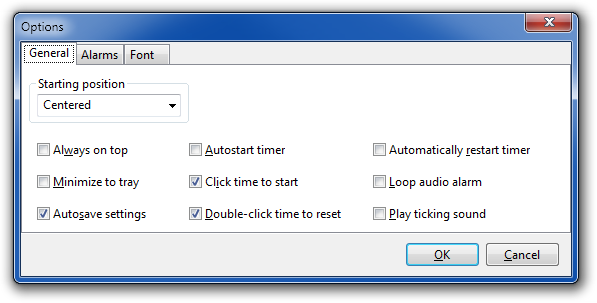
The first tab of the options dialog, allowing you to change settings making the window always on top or autostarting the timer when SnapTimer starts.
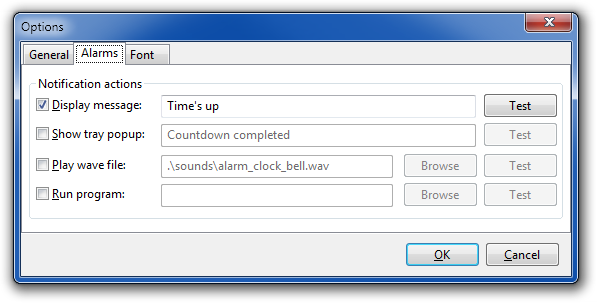
Customize the four different actions that can enabled when the countdown is completed.
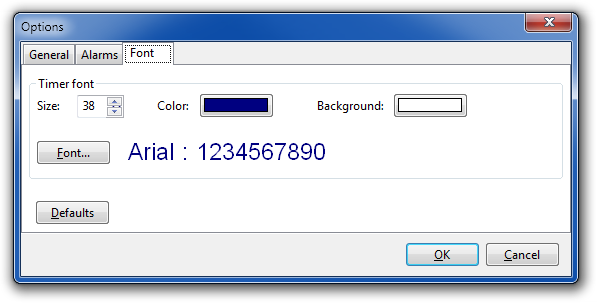
Change the font size, color and background color.