Logitech Marble Mouse trackball
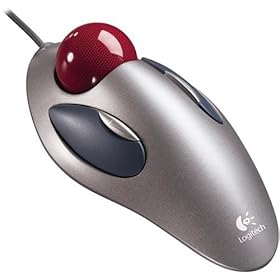
Here’s a review I wrote for Epinions on the Logitech Marble Mouse, which I bought a few months ago. I’m using it as I write this entry and it still works great.
Simple, yet functional and built to last
Aug 03 ’04
Pros: Smooth, doesn’t need cleaning, reduces wrist movement
Cons: Can’t scroll, no middle mouse button
The Bottom Line: It’s a comfortable, ambidextrous mouse that will last for years.
I started having some pain in my wrist because of the movement of the mouse, so I decided to buy a trackball. I found mine on Overstock.com and soon after I got it my wrist pain went away.
I love the fact that it’s optical and doesn’t need a mouse pad or very much room. It’s very functional in that regard. It also fits well into my hand so it’s comfortable for spending several hours a day at the computer. I frequently use it for 3-4 hours at a time when I’m programming and it’s fine.
It works equally well for both right and left-handed people. I currently use mine left-handed.
I’ve found that after several weeks of use a small collection of dust will appear on the wheel, as if it’s cleaning itself. All I have to do is remove the little chunk of dust from the ball and it keeps on working.
You can pull the ball out very easily for cleaning if you want to, but there’s really no need, unlike a normal mouse (not optical) which has to be cleaned every so often to get the grit and dirt off the wheels.
Now that I’ve covered what I like, here’s what I don’t like. There are only two buttons, so I miss being able to easily scroll up and down on web pages and using the middle button to paste text. In Windows you can set the double click to do different things like paste or scroll, but it’s not the same as having a three-button mouse. If they added a scroll wheel I would be pleased as punch.
Another thing I’ve found is that it’s a little hard to click both of the buttons at the same time, and since that’s what I do in Linux for pasting text, that can be a slight nuisance initially, but I’ve gotten used to it.
It works fine in Windows and Linux as a regular old PS/2 mouse. I emulate three buttons in Linux in the XF86Config file.
The price includes shipping.
Recommended
Yes
Amount Paid (US$): 25.94
Logitech is perfect. I have been using the Trackman marble wheel for 5 years now.
I have also tried the Trackman Marble FX, but I think that my hand just didn’t fit for that type. I work with the computer every day, so I need the best. But even the best might not be good enough since making the same movements all the time is not good for you. The solution for me is to use to diferent pointing devices. One for home and one for work. While I use the above mentioned at home I have found a great suplement for work. The Wacom Pen:
I can’t say which of those above is best for me, but they just suits me. And I like using both.
My dad has one of those, and it is very nice to use. Another advantage is that it takes far less desk real estate and the cord doesn’t get tangled in anything since it never moves.
I’ve been using my logitech trackball for 4 years I think? No problems with it, except occaisionally the ball pops out when the cat knocks it onto the floor, but the ball is easily replaced. And once in awhile you have to take the ball out to clean it b/c it’ll slip and you lose control of the pointer.
About scrolling, you can scroll with the trackball. There’s a delicate maneovering of the ball and your fingers involved but once you learn it there’s no problem.
Works fine with GNU/Linux, but its a pain in the a*s to get the scrolling to work.
Three Button Emulation is really not the problem, but I have been trying for _weeks_ to use those scroll buttons.
Without success. But others could made it.
But it’s worth its price, great mouse (except the scrolling-issue)
Count me in as another fan of the Logitech marble — and add in that, being an example of a neural network simulating a natural vision circuit , the marble is also probably the most state-of-the-art object in your entire household!
but now I have a critical problem: button-1 is sticking and I know I could clean it if only I could get the thing open, but removing the bottom 4 screws won’t let you separate the base from the cover shell.
how do you get this thing cracked open without destroying it? Can the buttons be safely pulled off somehow?
Oh yes…sold on trackballs,
I spend hours a day using them..my first logitech trackman lasted 7 years before a wire in the cord broke(marble was still fine)
even after being dunked in coffee a few times, slept on, droped, steped on,,hummmmm,,,, and thrown a few times
as far as buttons and wheels i prefer the trackman wheel mouse model 904353-0403…it is a right hand marble under the thumb with three buttons..(the middle button is actualy the scroll wheel which you still push down on for its button action. the default action of that middle button is to turn on/off using the ball as a window scroll,which means the cursor turns into a curious symbol and movement of the ball after that scrolls the window up/down and left right. this continues until you hit the wheel button agian and it changes it back.
another logitech is model 904360-0403 without the wheel and the marble is bigger and finger controled..this one has 4 buttons and is for either right or left use.
My trackball is now just over 4 years old and I have a complaint. The button is producing a double click when I only click it once. This occurs 20-30% of the time and it’s become a nuisance. I took it apart (remove the visible screws, then push your screwdriver through the faint plus sign on the label to reach the last and final screw deep in the case) but that didn’t help. I’ve reinstalled drivers and that didn’t help either. I’m out of ideas and plan to replace my mouse.
I have had many logitech peripheral devices.
The Marble Mouse is by far the best yet.
I have the previous version as well as the other trackman wheel.
It has a scroll wheel in the middle of the left and right button, the track ball is on the thumb area. Its a good alternative to the Trackball.
I am also having problems with double clicking with one click.
I have taken the cove off as the above poster said the fifth screw is under the information in the middle of the bottom. You can access it very easy by just inserting the Philips screwdriver threw the plastic.
I cleaned the small amount of debris (Plastic) from the top of the button. But this didn’t help. Ive had this trackball for about 3 years. I love Logitech and even if this problem isn’t solvable I’ll still buy another.
I moved to the track mouse when I started having elbow problems. The problems went away. I went to the marble mouse when I lost use of my right thumb for 9 months (not related to mouse use) and I wanted a mouse I could use with either hand. Once I got my thumb use back, I started using the trackmouse right handed at work, left handed at home. I switch off if my wrist gets tired. I love it.
as in Post 8. I removed the five screws, but I cannot access or remove the buttons to clean it.
As soon as I received 2nd marble mouse I will give a try to remove the buttons to clean it in order to use the buttons without problems…
My mouse is working again, yay!! I had the same double click problem, or no click at all when I wanted it to. Thanks, Dan for mentioning the hidden fifth screw. Once I got it apart I used some “Sprayway L2” deep penetrant and moisture displacer on top of the switches (just a drop), then I clicked a few times and wiped up the excess. I would have used contact cleaner but I didn’t have any. WD-40 would most likely have worked too but I used this stuff because it is non-flammable. Really I don’t think there is enough of a spark in there to worry about. I figured I had nothing to lose if it didn’t work I needed a new mouse anyway. -kenthehumble
ps. While I was in there I put some lube on the other switches too and my scroll buttons are working better than they have for a long time too.